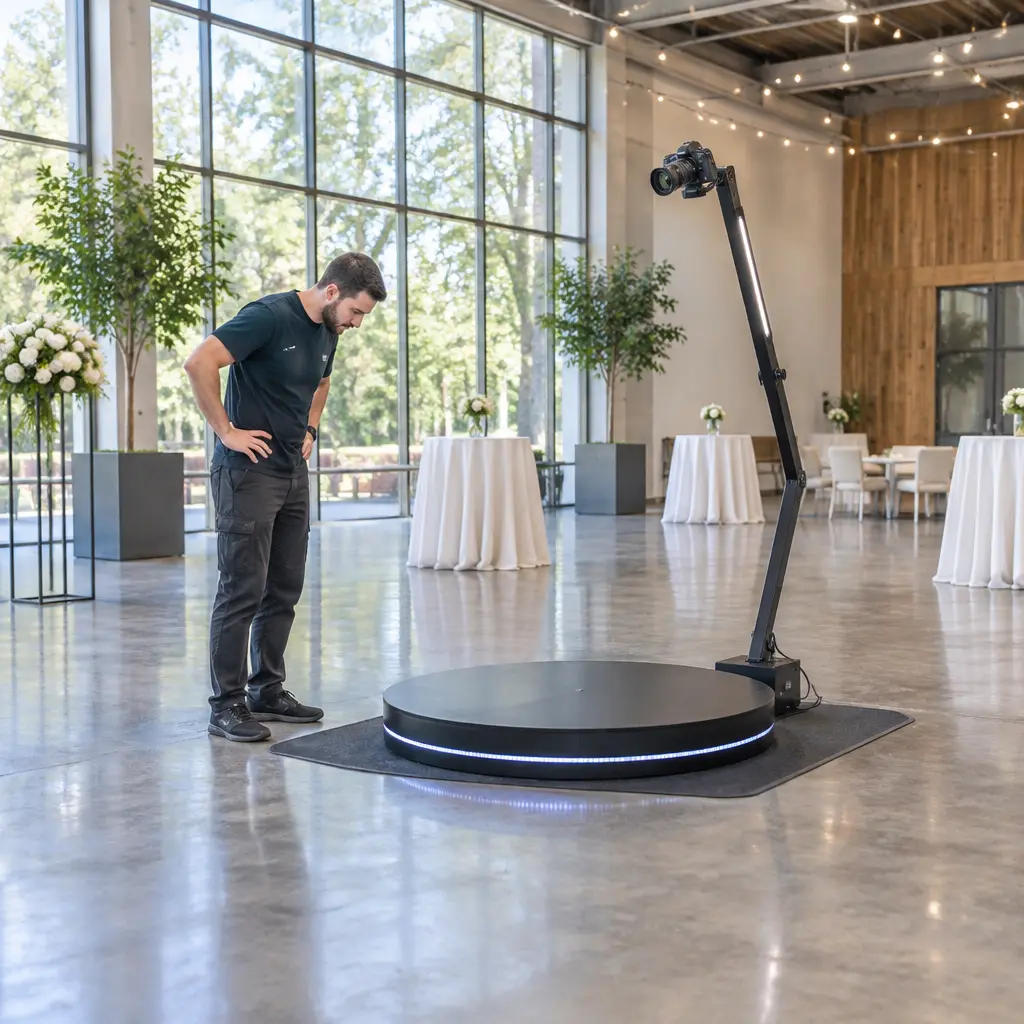
A 360 video booth is a camera-and-platform setup that records guests as a camera rotates around them; its appeal depends on both a stable installation and compelling footage. The practical priority is to secure and test the platform before pursuing viral content: a wobble, slip, overload, or unsafe approach can injure guests and disrupt an event, while creative effects can be added only after the equipment and operating area are controlled. This guide explains platform stability, capacity and inspection, safe operation, and content design, drawing on occupational-safety guidance and equipment-manufacturer instructions. No reliable, universal injury-rate statistic specific to 360 video booths is publicly established, so safety decisions should rely on site conditions, the actual equipment manual, and established fall-prevention principles rather than unsupported claims.
Platform stability defines safe 360 video booth operation
Platform stability is the ability of the booth’s standing surface and supporting equipment to remain level, secure, and within their specified operating limits during setup, use, and removal. The U.S. Occupational Safety and Health Administration (OSHA) does not provide a booth-specific definition, but its general industry rules require walking-working surfaces to be maintained in a clean, orderly, and sanitary condition and to have safe access and egress. For an event booth, that means assessing the platform, floor, moving arm, cables, barriers, and guest behavior as one system—not treating the circular plate as the only safety concern.
The relevant subtypes are structural stability (the platform and supports resist movement or failure), surface stability (the plate does not rock or slide), operational stability (the rotating camera assembly stays controlled), and access stability (guests can step on and off without tripping or crowd pressure). These categories connect directly: a level plate can still be unsafe if it is overloaded, placed on a soft floor covering, or surrounded by loose cables.
Structural capacity and load limits
Load capacity is the maximum load the manufacturer permits the platform and associated equipment to support. It must be checked against the actual model’s manual or product label, not estimated from appearance. Account for every participant standing on the plate, their movement, and any equipment attached to or supported by it. If the maker specifies a maximum number of people as well as a weight limit, follow both; do not assume one can substitute for the other.
The National Institute for Occupational Safety and Health (NIOSH) cautions that the Revised NIOSH Lifting Equation is a tool for evaluating certain two-handed lifting tasks, not a general-purpose method for certifying a platform’s capacity. Accordingly, event teams should not apply a lifting formula to invent a safe booth load. If the load rating is missing, unclear, or incompatible with the intended group, do not operate the unit until the manufacturer or a qualified technician confirms its limits.
Level placement, grip, and surface condition
A stable placement surface is firm, level, dry, and able to support the booth without rocking, sinking, or sliding. Inspect the floor and platform before each event and again after relocation. Avoid placing the booth across uneven joints, loose rugs, wet areas, ramps, or soft flooring unless the manufacturer expressly approves the setup and provides a suitable method to secure it. Keep the platform’s walking surface free of spilled drinks, decorative materials, and objects that could reduce traction.
A quick hands-on stability check can help identify movement, but it does not replace the manual or an engineering assessment. With the camera stopped and the area clear, verify that the platform sits flat, its parts are correctly assembled, and its fasteners and supports are secure. Do not improvise with wedges, tape, or loose blocks unless the manufacturer approves that method; makeshift leveling can shift under movement.
Rotating arm, cables, and surrounding clearance
Operational stability includes the moving camera arm, its attachment points, power supply, and control system. Before use, inspect for loose joints, damaged components, unusual vibration, or interference through the full intended rotation. Keep the rotation path clear of guests, furniture, décor, and walls. Route and secure cables so they do not cross walking paths or become caught in the mechanism, following the equipment maker’s instructions and applicable electrical-safety requirements.
The U.S. Consumer Product Safety Commission’s public guidance on cord safety highlights the general hazard of cords creating trip risks. That principle applies to booth power and data cables: route them away from entrances and queues, protect them with an appropriate cable cover when necessary, and never place a cover where it creates a new raised edge or blocks emergency access.
Inspection and setup verify 360 video booth stability
Inspection is a repeatable check that equipment is assembled, undamaged, and suitable for its location before people use it. OSHA’s walking-working-surface standard requires employers to inspect surfaces regularly and as needed, and to correct or guard hazardous conditions before use. While a temporary event booth is not automatically subject to every workplace rule in the same way as a permanent worksite, the inspection principle is useful: check before operation, after moving the equipment, and whenever conditions change.
Pre-event inspection sequence
A written checklist makes setup consistent across operators and venues. At minimum, check the following items against the manufacturer’s instructions:
- Confirm the model, rated load, assembly requirements, and any restrictions on simultaneous participants.
- Inspect the platform, base, fasteners, arm, camera mount, power connections, and controls for damage or looseness.
- Confirm the floor is level, firm, dry, and clear of debris; verify that the platform does not rock or slide.
- Test the mechanism without guests, observing its full rotation for abnormal movement, noise, or obstruction.
- Secure cables and establish clear access, exit, and waiting areas around the moving arm.
- Check that the operator can stop the equipment promptly and knows the maker’s shutdown procedure.
If a check fails, stop and isolate the booth until the issue is corrected. Do not let event pressure or a short booking window turn an unresolved defect into an acceptable risk.
Venue conditions and crowd management
The venue determines whether a technically sound booth can be operated safely. Consider floor slope, carpet thickness, nearby doors, lighting, overhead obstructions, electrical access, and the expected size of the queue. Set a boundary that keeps waiting guests outside the rotating camera’s path, and preserve clear routes to exits. An attendant should control entry, prevent additional people from joining a take beyond the permitted load, and stop the session if the platform shifts or the crowd presses against the setup.
The National Fire Protection Association’s guidance on means of egress emphasizes keeping exit routes clear. A booth should therefore not be placed where its platform, queue, props, or cable runs obstruct an exit or narrow a required passage. Venue management should approve the location before installation, especially in crowded or temporary event spaces.
Safe operation protects guests before content production
Safe operation is the controlled use of the booth by trained staff within equipment limits and with clear guest instructions. A stable platform is necessary, but it is not sufficient: participants can lose balance while turning, jumping, dancing, or responding to camera movement. The operator should explain how to enter and exit, what movements are permitted, and when the camera will start. Keep the rotation speed and effects within the manufacturer’s specified operating range.
Guest eligibility, instructions, and supervision
Guest screening means applying the maker’s age, size, mobility, and usage guidance before allowing participation. Do not make medical assumptions about guests; instead, provide clear instructions and offer a non-platform alternative for anyone who does not wish or is not able to use the device safely. Avoid overcrowding, horseplay, sudden group changes, and props that could snag on the moving arm. One responsible attendant should remain able to monitor the platform and operate the stop control throughout each session.
A concise briefing can state: wait until invited, step onto the center of the platform, remain within the marked area, avoid leaning into the arm, follow the operator’s movement cues, and wait for a full stop before stepping off. Tailor the wording to the specific booth and its manual; do not present generic instructions as a replacement for the manufacturer’s safety requirements.
Stop-work criteria and incident response
Stop-work criteria are observable conditions that require pausing or ending operation. Stop immediately if the platform shifts, rocks, or slips; the arm vibrates or makes an unusual sound; a fastener loosens; a cable enters the moving path; a guest exceeds the permitted load; or a person enters the exclusion zone. Switch off or isolate power according to the manual, keep others away, and do not restart until the cause has been identified and corrected.
If someone is hurt, stop the booth, arrange appropriate first aid or emergency assistance, and follow venue reporting procedures. Record what happened, the equipment state, and any corrective action. Incident notes help identify recurring setup problems; they should not be used to downplay near misses simply because no injury occurred.
Creative content follows verified 360 video booth safety
Content design is the planning of poses, props, movement, lighting, and editing to create engaging footage. It should be developed within the safe operating envelope—not used to justify faster rotation, extra participants, unstable staging, or risky stunts. The safest creative choices often come from choreography, framing, transitions, and post-production rather than from adding physical complexity to the platform.
Low-risk creative direction
Low-risk direction keeps guests’ movements controlled and the camera path unobstructed. Use simple poses, coordinated hand gestures, still props, and a clear start-and-stop cue. Avoid jumping, wrestling, tossing objects, loose clothing near the arm, and props that extend beyond the platform. If a concept depends on movement or an accessory, test it with no guest present first and confirm it does not interfere with rotation, balance, or clearance.
Lighting and digital effects can make a clip feel dynamic without changing the platform’s mechanical demands. Check that lights, stands, and backdrops are stable and outside the moving path; secure decorations so they cannot fall or become entangled. A “viral” shot is not a success if it depends on a participant being pushed toward the platform edge or exposed to a moving component.
Privacy, consent, and responsible sharing
Consent is permission to record, retain, or share a person’s image under the event’s stated terms. Explain whether footage will be captured, how guests can receive it, and whether public posting is optional. Obtain any required permissions from participants or guardians and follow applicable privacy and data-protection laws. Make it possible to decline recording without being pressured, and avoid capturing bystanders who have not agreed to participate.
Content performance can be measured through views, shares, completion rate, or opt-in participation, but those metrics do not establish that a setup is safe. No universal, independently verified statistic shows that a particular booth effect or platform design guarantees virality. Event teams should treat reach as a secondary outcome and track safety indicators—inspection completion, defects found, near misses, and stop-work events—alongside content analytics.
A stability-first workflow makes booth decisions practical
A stability-first workflow turns general precautions into an actionable order of operations. It helps operators avoid the common mistake of planning the shot first and discovering too late that the venue, platform, or crowd layout cannot support it.
- Review the equipment manual, rated limits, and venue requirements.
- Select a firm, level location with adequate clearance and unobstructed exits.
- Assemble and inspect the platform, camera arm, controls, and cables.
- Run an empty-platform operational test and confirm the stop procedure.
- Mark the guest boundary, queue, and safe access route; brief the attendant and participants.
- Operate only within the approved load and movement limits, pausing whenever conditions change.
- Develop and publish creative footage only with appropriate consent and after safe operation is established.
For a simple visual aid, an event team can post a three-column “ready / pause / stop” check beside the operator station: ready means the platform is level and inspected; pause means a guest or queue needs repositioning; stop means any movement, damage, obstruction, or abnormal operation. This is an operational prompt, not a substitute for the manufacturer’s manual or a formal risk assessment.
Conclusion: secure the platform before chasing virality
Platform stability, inspection, safe operation, and responsible content design are connected parts of a reliable 360 video booth program. Confirm the equipment’s actual load limits, choose a firm and level site, inspect the full moving assembly, keep cables and crowds clear, and train an attendant to stop operation when conditions become unsafe. Only then should teams optimize choreography, effects, or social sharing. Before the next event, read the booth manual, coordinate placement with the venue, and document a pre-use check; those straightforward steps protect guests while giving creative work a sound foundation.
Sources: U.S. Occupational Safety and Health Administration, Walking-Working Surfaces, 29 CFR 1910 Subpart D, https://www.osha.gov/laws-regs/regulations/standardnumber/1910/1910SubpartD; U.S. Occupational Safety and Health Administration, 29 CFR 1910.22, General Requirements, https://www.osha.gov/laws-regs/regulations/standardnumber/1910/1910.22; National Institute for Occupational Safety and Health, Applications Manual for the Revised NIOSH Lifting Equation, https://www.cdc.gov/niosh/docs/94-110/; U.S. Consumer Product Safety Commission, Home Electrical Safety, https://www.cpsc.gov/Safety-Education/Safety-Guides/Home/Electrical-Safety; National Fire Protection Association, NFPA 101, Life Safety Code, https://www.nfpa.org/codes-and-standards/nfpa-101-standard-development/101; Equipment manufacturer’s operating manual for the specific 360 video booth model, consult the model’s official documentation before setup.